 |
|
|
|
|
|
|
|
|
|
|
|
|
|
 |
|
||||||||||||
 |
 |
 |
|
||||||||||
 |
|
||||||||||||
 |
 |
 |
|
||||||||||
 |
|
||||||||||||
 |
 |
 |
|
||||||||||
 |
|
||||||||||||
 |
 |
 |
|
||||||||||
 |
|
||||||||||||
 |
 |
 |
|
||||||||||
 |
|
||||||||||||
 |
 |
 |
|
||||||||||
 |
|
||||||||||||
Instructions: Page 12
Saving your files
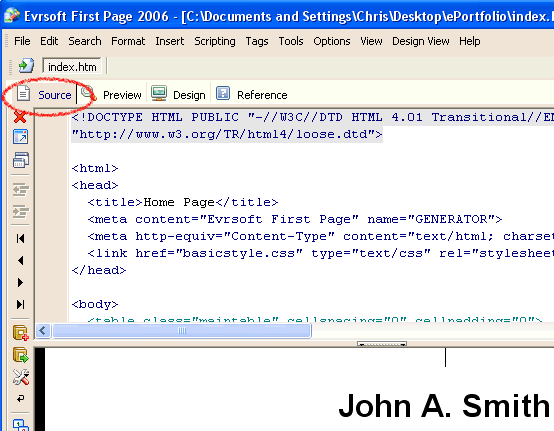
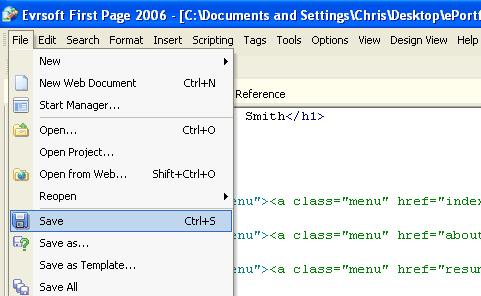
Before you close any of your html files in First Page, make sure that you Save your changes first. To save your file in First Page, you have to be in the Source mode. You CANNOT save your file while in the Design mode, so make sure that you click on the Source tab before trying to save! To save your file:
- Click on the Source tab near the top of the page.
- Click on the File menu at the top of the screen.
- Select Save to save your changes.
 |
Page | 11 | 12 | 13 | 14 | 15 |  |
 |